
Summer 2001 (very outdated)
Many students own a notebook computer, some carry it around with them all the time, but it is rare to see anyone in lecture taking notes with one. Naively this seems to be a missed opportunity, as digital documents are superior to hand-written documents in many ways: being searchable, editable, easily sharable, and more legible.
Of course paper and pencil is a superior technology in many ways, but
there are many tasks where digital devices (PDAs are computers) are
preferred, because the advantages of the computer outweigh the
advantages of pencil and paper for these tasks. The question of how to
build systems to support classroom note-taking has been addressed
tangentially, in the context of work on electronic classrooms and
on computer-supported collaborative work, but there seems to be no
published work on the question of how to support the basic note-taking
process.
This paper addresses two questions: First, what software and hardware
features are required to support note-taking? Second, is it possible
to build a successful note-taking application today using common
hardware?
This section surveys the relevant properties of lecture notes, based on observations in the education literature [kiewra85],[vanmeter] our experiences as students and teachers, and observations of a small corpus of engineering lecture notes in Japanese, taken by exceptionally good students. As there is much individual variation in note-taking practices, the analysis below is applicable only generally, not universally. The focus in this section is on the mechanics of note-taking, not the role of note-taking in learning.
The above factors provide an explanation for why almost no-one takes lecture notes using a computer: the requirements are unique and not
met by any existing, or proposed, mass-market tools, such as standard
editors, drawing tools, and notepads.
This section builds on the above analysis to propose 6 principles for the design of a tool for taking lecture notes.
As a preliminary experiment, we had 5 subjects attempt to take notes using a standard notebook PC with a mouse. In class it proved impossible to keep up, and in a controlled experiment where we asked subjects to copy a page of notes, it took about twice as long, on average, with the computer than with pencil and paper. The most salient problem was the difficulty of drawing diagrams etc./ with mouse. We conclude, unsurprisingly, that a pen is necessary for taking lecture notes.
Although the presence of diagrams and other graphic elements is a
hallmark of lecture notes, it is nevertheless the case that most
lecture notes consist mostly of text.
For text input the keyboard is of course at an advantage. Moreover,
obviously, typing produces text which is more legible (
While we noted above that students tolerate some sloppiness in their lecture notes, other things being equal, more legible text is preferred to less legible. And it has further been reported that notes handwritten on a PDA take 37/% longer
to read than notes handwritten on paper [notepals]) and editable and
searchable (of course, recent advances allow even handwritten text, saved as an image --digital ink-- to support some editing functions, such as copying, underlining, and highlighting, and even some searching [scribbler]). For many users keyboard input is faster and less tiring. To measure this, we did a little experiment by having 4 subjects, all experienced typists and heavy computers users, input the same page of text, an excerpt from AI class notes, by hand and by keyboard. The first result was that typing was faster by a factor of
1.4 to 2.0 times over handwriting. The second result was that
subjects reported that typing was less tiring than writing.
Note that the speed and comfort advantage of the keyboard is evident
even when compared with pencil and paper. (The magnitude of this
advantage could be different for alphabetic languages like English.)
Compared with the keyboard-free alternatives, namely handwriting
recognition and soft keyboards, the physical keyboard is at even more
of an advantage. Thus the common vision of a future ruled by ``pen
computing'', where the pen is the principal or only input device
[tablet-pc], is probably not suitable for students taking lecture
notes.
The task of the lecture note tool designer is, therefore, to combine
the freedom of the pen for diagraming with the efficiency of the
keyboard for text entry.
In the preliminary note-taking experiment we observed frequent
movement of the right hand back and forth from keyboard to mouse, as
positioning and menu-selection were interleaved with text entry. In
particular, a significant amount of this tool switching was involved
in selecting the text entry point, inputting the text, then moving to
the next text entry point.
For pure pen computing, of course, there is no such tool-switching:
the hand and fingers can do both positioning and writing. Thus the
speed advantage of the keyboard, noted earlier, is balanced out by the
time cost of tool switching; with the time cost worse as the text
chunks get smaller and farther apart. To estimate how this trade-off
applies to lecture notes, we had an experienced typist type 10 text
chunks, each of 5 English words, requiring 30 keystrokes, at roughly
specified positions, and then create the same content with pencil and
paper. The times were approximately the same, suggesting that lecture
notes are at about the crossover point. That is, for the computer
versus paper choice, the increased text-entry speed and the
tool-switching overhead essentially cancel each other out for
note-taking.
Assuming that the time cost of keyboard-to-pen switching is greater
than the time cost of keyboard-to-mouse or
keyboard-to-trackball/trackpoint/touchpad switching, note-taking
systems should include a mouse or equivalent. Another factor arguing
for retention of a second pointing device is Kato's finding that the
mouse is faster than the pen for men selections [kato2].
It is still possible that the pen may be acceptable as the sole
pointing device if users are trained to be able to type while holding
it, possibly wedging it between their fingers (under the index finger
and resting on the back of the thumb and the back of the middle
finger) when not in use. It may also be possible to invent some way
to attach the pen to the hand, turning it into a kind of prosthetic
sixth finger: so far we have come up with nothing better than
attaching it parallel to the base of the index finger with a rubber
band, so that it can be flicked above the finger out of the way when
not in use, then flicked back to draw with. But for now, use with a
mouse seems most practical.
The tool-switching overhead is worsened if the application requires the user to create text boxes. For many drawing tools, to put some text somewhere involves, in the worst case, 4 preliminary steps:
To minimize tool switching, it is important also to minimize the time
spent using the mouse during text entry. For existing tools there
are many common actions that are intimately related to text-input but
which generally require mouse actions. For example, highlighting,
underlining, font changes, and adding ovals or boxes around text all
generally are done with the mouse. Thus a tool for lecture
note-taking should minimize the number and cost of such
tool-switching.
For existing tools, a text operation such as underlining is usually
are done in two steps: 1 select a region of text by dragging with
mouse, then 2 select a menu command with the mouse. (Of course power
users use shortcuts to avoid some of these time penalties here).
After this there is often a third step, where the user moves the
cursor back to the text region to continue work on it.
To avoid the need for Step 1, note-taking tooks should have implicit
text selection, so that operations apply automatically to the text
chunk the cursor is currently in. For example, a font change should
automatically apply to all text that already has been entered, or
subsequently will be entered, in the current text chunk.
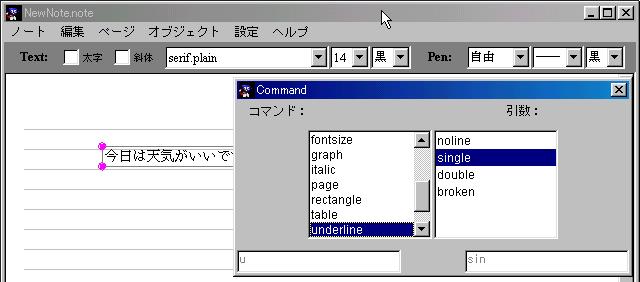
To avoid Step 2, text operations should be invokable from the
keyboard. Since in practice shortcuts are hard to remember, in our
system this is done with ``pop-up commands''. First the user types Shift+Enter to get the pop-up command window (the following figure).
In the preliminary experiment, subjects seemed to take a lot of time
drawing mundane things, like the x and y axes of a graph, using
primitives. Therefore a tool for lecture notes should should make it
possible to create these simply. In our system this also is done with
pop-up commands. Thus, to create the x and y axes of a graph, the
user positions the cursor in the desired position, invokes the pop-up
command ``graph'' to create the axes, and then, if necessary, resizes
the axes as desired.
This idea could be extended to cover cases where text appears in
standard positions relative to graphic elements. For example, having
generated x and y axes, in most cases the next thing to do is label
them. This currently requires separately entering text for each
label, which requires intermediate positioning steps. Rather the
system should enable the user to immediately put the text in the right
places. For example, the user should be able to use the tab key
or something to jump to the x-axis label entry position and then again
to the y-axis label entry position. Such a scheme would also be
useful for entering the limits of a Sigma, the numerator and
denominator of a fraction, and so on.
Our hypothesis is that a system based on the above design principles
is preferred to paper and pencil for taking lecture notes.
This claim could be evaluated by time-and-motion studies, by measuring
the learning gains of using such a system, or in other ways. So far,
however, we have merely built a system, observed students using it,
and asked their opinions.
We implemented a system, called NoteTaker, based on the above ideas.
NoteTaker includes the special features discussed above plus many of
the familiar functions found in drawing tools, including line drawing,
stretching, copying, gridding, colors, importing images, saving to a
file, printing, scrolling, search, and rudimentary navigation among
pages.
Regarding operations on text, as noted above the primary operation is
text input. If the cursor is on a blank area, typing starts a new
text box. If the cursor is over existing text, typed
characters are appended to the end of that text. In order to move
text, a less frequent operation, it is necessary to first select it,
with a single click (selected objects are indicated with pink balls at
the four corners). In order to use the mouse to select an editing
position within a text chunk, also a relatively rare operation, it is
necessary to first open it with a double click.
For the sake of rapid development we built the system in Java. The
source code is about 4000 lines. For the experiments below subjects
used NoteTaker on a Notebook PC (Panasonic CF-02: 300mhz Celeron CPU,
64MB memory, SVGA 800x600, 10.4 inch TFT color LCD, Windows 98) with
a passive touch sensitive display.
The main problem with this implementation was poor support for drawing. The driver produced pen events in mouse emulation mode,
accurate only to the pixel. Moreover our Java code for handling these
events, probably sampled at infrequent intervals to begin with,
introduced a lag and also dropped some events (Dropping events
would have been a critical problem for handwritten letters or characters, but for drawing, which is mostly straight lines and/or done slowly, this was not fatal). Also our system did no anti-aliasing or curve-fitting. Moreover, the vertical distance between the screen top layer (where the pen touched) and the
display layer (where the cursor appeared) meant that there was an
offset, depending on the viewing angle, which made precise alignment
with previous figures or text difficult. Furthermore, given the
viewing-angle constraints of the display, users had to work with the
display up at an angle, not flat on the desk, and as a result it
wobbled slightly when written on. All of these problems could of
course have been solved by the choice of more appropriate hardware and
software.
The implementation also had a few minor bugs, but none of
these seemed to significantly affect subjects' perceptions of the
system. (We plan to release a fully debugged version of NoteTaker by
the end of 2001.)
We asked one of our friends, who happened to own a notebook
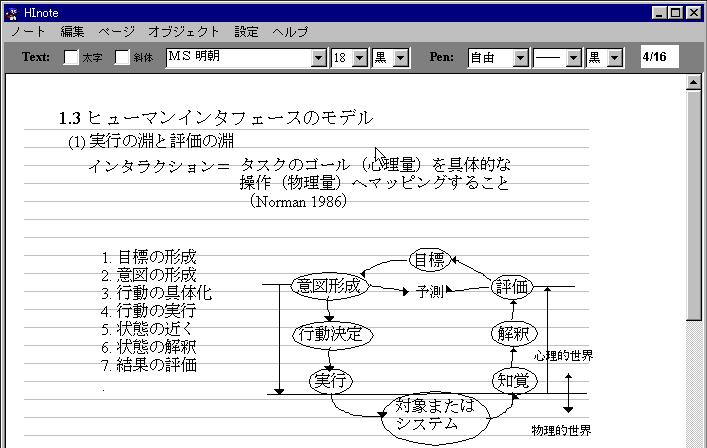
PC (:Fujitsu FMV-BIBLO MC3/45: 450MHz Celeron CPU, 192MB memory, SVGA 800x600, 10.4 inch TFT color LCD, Windows98SE) with a touch sensitive display, to try out an early version of NoteTaker for one class session. He chose to try it in the graduate HCI class, and then continued to do so for the whole semester, producing the equivalent of 16 A4 sheets of notes over 14 class sessions. The following figure is an example. Thus we fortuitously acquired one long-term user.
As hoped, NoteTaker was overall preferred to pencil and paper. Specifically
to the question ``would you like to use NoteTaker in the future'',
the average reply was 3.8, although there was substantial variation,
with 2 subjects replying ``very much'' (5) and 1 replying ``no'' (2).
The long-term user replied ``very much'' (5). The free comments field
elicited opinions such as an appreciation of the improved legibility,
and the ability to reorganize.
The subject who preferred paper remarked that it allowed her to write
exactly what she wanted more easily. As this subject was one of those
who had let us make copies of their old lecture notes, we examined
them to see if there was was anything unusual. These were relatively
content-rich and carefully organized and written, suggesting that
NoteTaker is currently useful only for students who tolerate a certain
amount of sloppiness.
The two subjects who indicated that they were indifferent between
NoteTaker and paper coincidentally circled the ``would like to use it
for a research notebook'' item. And in follow-up questioning both
mentioned that research notes are produced at the speed of thought; we
assume this meant that he have found NoteTaker hard to use under time
pressure (although apparently not harder to use than paper).
Thus subjects generally considered NoteTaker to be worthwhile overall.
This subsection discusses the specific advantages and disadvantages.
Regarding the quality of the notes produced: based on our examination,
lecture notes produced with NoteTaker, compared to notes on paper,
had, as expected, significantly more legible text, significantly
messier figures, and somewhat sloppier layout, for example in terms of
vertical alignments. Overall they seemed to be roughly equal in
quality to the notes on paper.
The physical ease of use of NoteTaker was rated 3.9 on average,
compared to paper, where 5 was ``very comfortable'' and 1 was ``very
tiring''; all but one user considered it less tiring to use NoteTaker
than pencil and paper. The exception remarked that pencil and paper
allowed more freedom of posture. The long-term user
considered NoteTaker to be ``somewhat more comfortable'' (4).
However the cognitive cost of working with NoteTaker was higher than
that of working with paper; most subjects considered it ``somewhat
more tiring''(average rating 2.4). Although two subjects considered
rated it less tiring, it turned out that they were thinking about the
improved readability of the result; thus all users found the input
process itself to be harder. While this needs to be analyzed further,
we see two main causes for this: first, drawing difficulties, as
discussed above, and second, the fact that subjects were far less
familiar with NoteTaker than with paper, as seen, for example, by menu
surfing behavior by some subjects. Over use, this second problem
would probably decrease, considering that the long-term user rated it
cognitively ``somewhat less tiring'' (4) than paper.
Regarding ``automatic text-box generation'', we observed one minor
problem: if the user happens to bump the trackball while typing,
causing the cursor to stray outside of the current chunk of text input
so far, subsequent characters appear at the new cursor position.
Learning to avoid this was however fast. Automatic text-box
generation was well liked by subjects: all rated it ``rather useful''
(4) or ``very useful'' (5).
Pop-up commands, compared to short-cut keys, were liked by some users,
who mentioned their availability from the keyboard without having to
remember anything. Most users, however, preferred short-cut keys,
often remarking that they were faster.
The quality of the pen-drawn figures and the ease of drawing with the
pen were both rated ``rather bad'' or ``very bad'' by all users, unsurprisingly
Regarding the merits of the pen versus the mouse (no one used the
trackball, probably due to unfamiliarity):
as expected, almost all subjects reported that the mouse was better
for positioning and the pen better for drawing, and that switching
between keyboard and mouse was easier than switching between keyboard
and pen. Observations of the users also revealed that they used the
pen only for drawing fairly complex diagrams, not for positioning,
selecting, or drawing simple lines, although this may have been due in
part to more familiarity with the mouse.
Given that our system allows the user alternative ways to do things ---
for example, an oval can be created with the keyboard, the pen, or the
mouse --- we were concerned that users would be confused with which
tool to use when, but this did not seem to be a problem.
Ultimately, of course, the criterion for judging a tool for taking
lecture notes is whether it improves on pencil and paper in terms of
learning outcomes. Unfortunately this is hard to measure directly,
and the educational value of lecture notes has not been well modeled,
so currently we can only speculate.
Most studies support the idea that the role of notes in learning is
two-fold [kiewra85],[vanmeter]. First, obviously, notes are useful
when reviewing. Second, the process of note-taking itself is
generally thought to be of value. This is usually explained in terms
of encoding: the student is initially faced with a bunch of inputs
from the instructor, verbal and written on the blackboard, which need
to be assimilated. In the process of taking notes, the student has to
re-express those inputs, and in so doing, the ideas get mentally
re-encoded in a form that is easier for him to digest and
remember (One of our friends uses a standard text editor,
Emacs, to take notes; thus his re-encoding task is to convert sketchy
2-D blackboard notes into linear textual content. This sort of extreme re-coding while listening is probably beyond the
ability of most students).
Lecture notes taken by computer, since more legible, probably serve
better than handwritten notes at review time. Also, since the basic
mental encoding process is the same, regardless of what specific
finger and hand motions the student uses, we would expect no
difference in learning effects during note-taking. However two
concerns remain.
First, does computer-based taking of lecture notes encourage or
discourage the student from doing the re-encoding? That is, are
computer-based lecture notes, compared to handwritten notes, more or
less likely to be slavish unthinking copies of the blackboard? Our
little experiments showed no difference, but this needs to be
confirmed.
Second, does computer-based taking of lecture notes require the
student to waste precious attention dealing with the system, making it
impossible to devote full attention to the class? This concern has
surfaced before, regarding meeting notes, where it is said that
``people prefered handwriting to typing, saying that it was easier to
listen while writing than while typing'' [wilcox97]. Certainly
it is conceivable that use of the keyboard and mouse requires
fundamentally different neural pathways from paper, and intrinsically
interferes more with listening or thought. However it is also
possible that the difference may be just one of familiarity, and that
over time a computer note-taking tool may become as comfortable as
paper. This needs to be studied.
Our proposal fits in well with various research advances and trends.
Stifelman has shown how the audio portion of a lecture can be usefully
indexed from the lecture notes [stifelman]. Abowd [abowd]
has explored ways to provide the instructor's slides and notes and
peers' notes to students. Various techniques for organizing and
indexing digital notes have been analyzed [erickson96,notepals].
Mimicking various useful properties of paper in digital systems is an
ongoing research goal [fishkin00]. The ultimate system for
lecture note-taking should incorporate all these features.
Other forms of note-taking have also recently been studied: daily
notes for personal use [erickson96], engineering notebooks
[gwizdka], meeting notes [wilcox97], and notes for problem
solving [trafton-tricket]. While some of the properties of such
notes are similar to those of lecture notes, the design presented in
this paper is probably not directly suitable for these tasks.
The one technology which threatens the utility of note-taking by
computer is, of course, the copy machine. This was the reason our
long-term user gave for not using NoteTaker for all his classes: most
instructors handed out lecture notes at the start of each class, and
he found it easier to just write his notes on those hand-outs.
However lecture notes are becoming digitally available, on the web if
not directly [abowd], and as paper hand-outs are replaced with
digital hand-outs, the motivation to take lecture notes and make
annotations with a computer will grow.
The needs of students taking lecture notes are fairly clear, and are
not satisfied by existing drawing tools or editors. We propose a
design which uses pen, keyboard, and mouse-or-equivalent, where
text entry at arbitrary positions is optimized, and where common text
decorations and drawing sequences are easily invoked. Barring the
appearance of some new interface technologies that magically resolves
the issues discussed above, we think that any application for taking
lecture notes will need the features proposed in this paper.
Since a system using sub-optimal hardware was still prefered to pencil
and paper (at least by engineering students), the prospects for
lecture note-taking by computer appear bright. Nothing in our
analysis or design was limited to the needs of any specific population
of students, so wide dissemination probably requires mostly just the
further spread of basic computer literacy, plus continued progress on
the hardware front, to further close the usability gap relating to the
physical properties of paper.