Wearable translator specifications
Jani Patokallio, University of Tokyo
Thought of the day:
"Until we can offer some alternative to the anachronistic technologies we are using today to interact with computers (keyboards? mice? not exactly intuitive for Joe Sixpack are
they?) extending the domain for computers is going to fail. "
-- Dan Hayes
The four directions of translation
The answer to the question: You're a tourist or businessman
in a far-away land. What should your magic box do so you
can communicate?
|
native |
foreign |
| speech |
--> |
<-- |
| writing |
--> |
<-- |
Native to foreign speech
Input: User's speech in native language
Output: Speech/writing in foreign language
Tech Reqs:
- Input device (microphone, single-user)
- Output device (speaker, plug or video)
- One-user speech recognition
- N-to-F translation engine
- Speech synthesis of output
- and/or written output to video/screen
Feasibility: May actually be usable in optimal situations
Foreign to native speech
Input: Random speech in foreign language
Output: Speech/writing in native language
Tech Reqs:
- Input device (directional microphone/input jack)
- Output device (earbud speaker, pref. written on user display)
- Multi-user speech recognition (oh dear...)
- F-to-N translation engine
- Speech synthesis of output
- and written output to user's display
Feasibility: Unlikely to be use unless pre-trained for
the person speaking
Foreign to native writing
Input: Random text in foreign language
Output: Writing in native language
Tech Reqs:
- Input device (high-res still/video camera) with frame grabber
- Output device (user display)
- Foreign-language OCR engine (oh dear oh dear...)
- F-to-N translation engine
- Written output to user's display
Feasibility: Might be able to get a large sign
right every once in a blue moon...
Native to foreign writing
Seems unlikely to be of use in a wearable setup?
Of course, you may want to convert static documents
(web pages, notes, whatever) back and forth, but
this is not really a wearable application...
ignore for now.
But what about the interface?
The way the user will actually interact with the system
is ignored completely -- even though that's what this thesis is all about!
So for the moment, we're trying to figure out what we will need
in any case, and the kinky problem of user input and interaction
will be shunted to one side...
Some pointers for the future anyway:
- IBM Japan's eyeball-tracking pointer (amazing esp. for writing!)
- FingeRing wireless ring keyboard
- The trusty old Twiddler chord keyboard
Initial preference would be to reject the old finger-operated-device
paradigm entirely and go for something new, but more about in
another document...
Design parameters
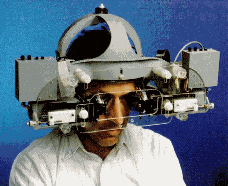
The fuzzy definition of a wearable computer is that it's a computer
that is always with you, is comfortable and easy to keep and use, and
is as unobtrusive as clothing.
-- MIT Media Lab
Important factors:
- Convinience: must be instantly accessible at all times
- Transparency: not inconvinient to wearer, not obtrusive to others
(buzzword: augmented reality)
- Portability: effortless to carry around, rugged enough to resist
normal wear and tear, operational on the road
Less important factors
- Price: we're at the bleeding edge here, prices will go down
as time passes and volumes increase...
Implicit assumptions
We want just one system that performs as many of the four
listed tasks as possible. (In practice, we will probably end up
doing a number of prototypes, or at least try out different
peripherals.)
We want a computer that runs Linux and, if possible,
open-source software. This is a prototype, it will need
lots and lots of improvement, it would be good to be able to tweak
and reuse software to suit our purposes...
We want an eye-level display that augments the normal
field of vision. Wristpad screens, immersive displays, etc are not
usable for conversations.
We assume the translator is a stand-alone application:
the computer will either support only the translator, or
it will at least take over the display, input and output while
in use. This assumption may or may not be reasonable.
Component-level requirements
Display requirements
This is the tough one, all the really good stuff is still
just a teensy bit out of reach...
- User must be able to interact with the world despite the display
- Sufficiently high-resolution for displaying kanji
- High-end
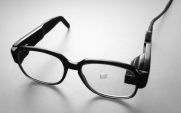
- MicroOptical Integrated Eyeglass Display (Y586,000)
+ entirely invisible
- low resolution (320x240 until Nov-Dec 2000, 640x480 after)
- seriously overpriced...
- no discounts possible
+ prices will drop once the 640x480 model comes out

- IBM VisionPad (N/A)
+ visible, but no worse than a speech mike
+ not just a display, but a complete high-powered system
+ developed by IBM Tokyo Research Labs
- low resolution & 256-grayscale (in 1998!)
- not a commercial product, probably not available
- Medium-end

- Sony PC Glasstron PLM-S700 (Y300,000)
- Olympus Eye-Trek FMD-700 (Y150,000)
+/- look like opaque sunglasses
+ high-resolution (800x600)
- evidently see-thru mode is not sufficient indoors?
- Olympus's 800x600 res is only interpolated
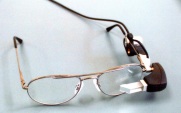
- MicroOptical Clip-On Display (Y257,000)
+ technically identical to MicroOptical IED, upgradeable
- looks like mechanical finger pointing into eye
- low-resolution
- Low-end
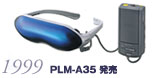
- Sony Glasstron / Olympus Eye-Trek / Canon GlassType
consumer models (Y50,000-100,000)
+ Sony Glasstron Lite (PLM-A35) seems to be the best of the
bunch: sharp display, 95g, Y58,000
- video input only, VGA requires converter (~Y10,000)
- low resolution (roughly 320x240)
- no see-through mode
- is seeing around enough?
- video input through camera?
- monocular hacking?
- Not applicable
- Virtual reality helmets and similar fully-immersive tech
- Crusty old patch-over-eye monocular displays (TekWear,
Liquid Image, etc.)
- Anything requiring inordinate amounts of HW hacking
CPU/Memory/Storage requirements
Bulk equipment, lots of companies in the miniature computer
market all offering more or less the same stuff...
- Enough computing power to drive real-time translation engine
(IBM ViaVoice?)
- Interfaces available for input and output devices
- VGA output for display
- Audio in(/out?) for translation
- Low power requirements
- Must support Linux!
What else?
- Networking
- Power source
- Harness/belt/means of actually carrying it around
Prototype A
Equipment:
- Sony Glasstron PLM-A35 (Y58,000)
- Miniature VGA-NTSC converter (~Y10,000)
- Laptop (borrowed from lab)
- Headphone & mike (borrowed from lab)
- IBM ViaVoice (borrowed from lab)
- Misc. cables, backpacks, straps and clips (scavenged or purchased)
Estimated cost: ~Y75,000
Features:
- Translation types 1 & 2 (native <-> foreign speech)
- Wearable display
- Luggable computer
- Traditional user interface (except for display),
but upgradeable (can use Twiddler, etc)
Summary: Reasonably cheap and very fast way of getting a functional
setup working and seeing what direction to proceed for
more experimental work