Due Date: correspondingly, Thursday, September 8, 2005, or Friday, September 9, 2005, before the beginning of your lab section.
The goals of this assignment are:
Problem 0: Starting BlueJ
The first thing you will need to do is to open a tool that will help
you create your Java programs. For this semester, this tool is
BlueJ. Look for the BlueJ icon either on your desktop or the Start
Menu and launch BlueJ.
The first time you launch BlueJ, a window called BlueJ Launcher will ask you to select a Java version. For this, you need to do the following:
Problem 1. Your First Program (5 points)
Follow the TA's instructions to create a new BlueJ project in your own
drive (H:). It is recommended that you create your programs in this
drive since only you have access to it, so you won't be at risk of
someone else stealing your work (and that can lead to trouble).
Problem 2. Book Exercise (5 points)
Page 6 of your textbook presents three phases for creating a
program. For this exercise, you will practice working with the
Problem-Solving Phase.
Using the three steps of the Problem-Solving Phase, try to solve the problem presented in Figure 1.13 on page 24 of your book. You should not try to write a program. Rather, write out what you do to follow the three steps of the Problem-Solving phase applied to the problem.
Problem 3. Book Exercise (5 points)
Using the steps of the Problem-Solving phase, work on problem 2 on
page 38 of your textbook.
Problem 4. Drawing Algorithm (5 points)
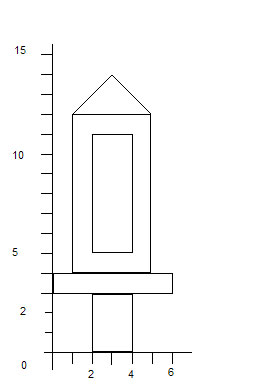
Using the steps of the Problem-Solving phase write an algorithm that
will help anyone draw the picture below without that person being able
to see it.
Make sure that you are specific enough so that there are no misunderstandings or extra additions to the drawing. Try having someone outside of class (a friend or family member) go through the steps and see how they perform.
Note: You can use descriptions such as draw a triangle or make a circle but not descriptions such as draw a rocket or like a sky-scraper.
Deliverables
A printout of all of your classes with your name and modifications on them.
Your TA will instruct you.